Free Online Scoreboard. Keep Score Live.
Create online scoreboards, leaderboards, counters, and tournament brackets on one platform. Track scores and points for sports, games, competitions, and events. Share live results instantly with a simple link.
Keeping score has never been easier.
500,000+ boards created • Trusted worldwide
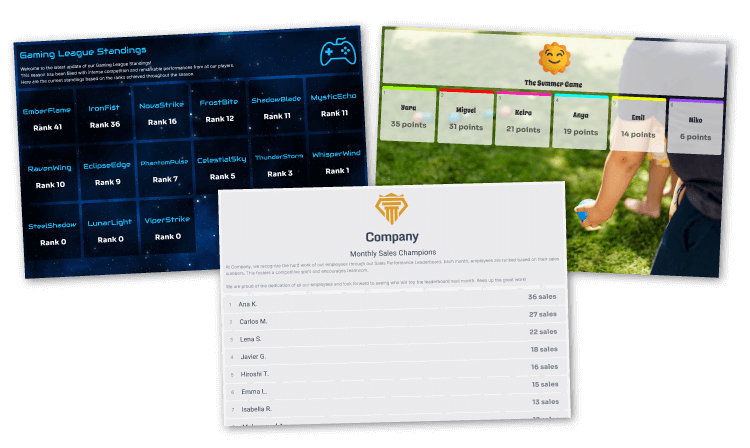
Free scorekeeping app
Online real-time results
Highly configurable maker
Easy and intuitive solution
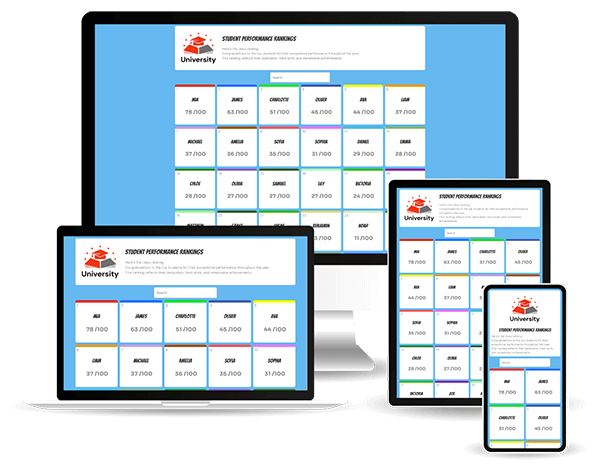
Perfect on any device
All you need is a web browser, no software or app installation necessary. On a desktop, laptop, smartphone, or tablet, you can easily create, launch, and update your own custom scorekeeping board.
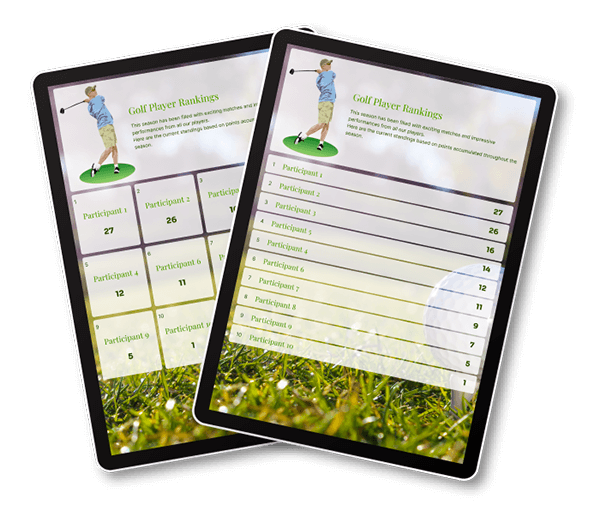
Find the one that suits you best
Do you require a scoreboard, leaderboard, or just a simple counter? Choose the option that fits your needs. Each one is designed to help you keep scores with maximum efficiency.
Why choose ScoreLeader for your scorekeeping needs?
ScoreLeader is a powerful, free online application that goes beyond basic scorekeeping. It’s designed to be flexible, adaptable, and easy to use, meeting a wide range of scoring and display needs (games, sports, educational activities, tournaments, and more). Here’s what makes ScoreLeader stand out:
- Comprehensive and configurable: ScoreLeader’s scorekeeping app includes a highly customizable editor, allowing you to create scoreboards, leaderboards, scoresheets, various counters, and tournament brackets in minutes. On our website, set up the perfect configuration to suit your needs, all without installing anything. It’s suitable for organizers, spectators, or even players who want clear and precise score tracking.
- Real-time display across all devices: ScoreLeader is the ideal tool for displaying live scores seamlessly across all devices—computers, tablets, and smartphones (Android, iOS, Windows, Mac, among others). With just a browser and an internet connection, you can create an online scoreboard, leaderboard, or tally click counter using a user-friendly interface generator.
- Expanding sports support: In addition to the features already available in the sports scorekeeper, ScoreLeader is continuously expanding its services to support a wide range of sports, including basketball, baseball, football, soccer, and many more.
- A growing solution to meet your needs: ScoreLeader already meets many of your requirements, and you’ll continue to discover its potential as you use it. Experience the power of a versatile digital scorekeeper app that’s designed to impress.
Start using ScoreLeader today—no sign-up required—and see how this all-in-one creator can transform your scorekeeping experience with a professional, efficient, and memorable way to track and display scores.

Review by Dominic
Review by Yo
Start instantly. No account needed.
Frequently Asked Questions
What is ScoreLeader?
ScoreLeader is a free online scorekeeping app that lets you create and manage scoreboards, leaderboards, scoresheets, counters, and tournament brackets, all in one place. Scores and results can be updated in real time and shared with others through a simple public link.
What is an online scorekeeper?
An online scorekeeper is a web-based tool used to track, update, and display scores or results in real time. Unlike a traditional physical scoreboard or spreadsheet, it can be accessed from different devices and shared instantly with players, spectators, colleagues, or friends.
Who is ScoreLeader for?
ScoreLeader is designed for anyone who needs a simple way to keep track of scores, points, rankings, or results. It can be used by players, sports clubs, tournament organizers, schools, businesses, communities, event organizers, and individuals.
What can I use ScoreLeader for?
You can use ScoreLeader for sports matches, tournaments, multiplayer games, quizzes, classroom activities, office competitions, community events, and many other activities involving scores, points, rankings, or counters.
What types of boards can I create?
ScoreLeader offers several types of boards for different activities and scoring needs. You can create scoreboards, leaderboards, scoresheets, counters, sports scoreboards, and tournament brackets.
Do I need to download an app?
No. ScoreLeader works entirely in your web browser, so there is nothing to download or install.
You can use it on a computer, smartphone, or tablet with an internet connection.
Do I need to create an account?
No. You can start creating a board without signing up.
However, creating a free account lets you save, manage, and access your boards over time. Anonymous boards are intended for temporary use and require an account if you want to continue managing them after a limited period.
How do I create an online scoreboard?
Simply choose the type of board you want to create and configure it to suit your needs. You can add participants, customize the display and scoring options, and start updating scores directly from your browser.
Once your board is ready, you can share the public link or QR code so others can follow the results in real time.
Does the scoreboard update in real time?
Yes. ScoreLeader works as a live scoreboard: when you update a score or result, the public board is automatically updated in real time. Anyone viewing the board can follow the latest scores without refreshing the page.
Can I share my scoreboard with others?
Yes. Every board can be shared using a public link or QR code. Anyone with the link can view the scoreboard without needing a ScoreLeader account, making it easy to share live scores and results with players, spectators, colleagues, or friends.
Can multiple people update the same scoreboard from different devices?
Yes, with Premium. Shared access links allow you to give other people access to a board so they can collaborate and update it without sharing your ScoreLeader account.
Because ScoreLeader is web-based, collaborators can access the board from their own devices.
Can I display a scoreboard on a TV or large screen?
Yes. ScoreLeader runs in a web browser, so you can open the public scoreboard on a TV, computer, projector, or other browser-enabled display.
This makes it useful for sports events, tournaments, classrooms, offices, parties, and other live events.
Can I embed a ScoreLeader scoreboard on my website?
Yes. You can embed a ScoreLeader scoreboard directly on your website using an iframe.
This allows you to display a live scoreboard, leaderboard, or other public board on your own website, with scores and results updating in real time.
How is ScoreLeader different from a spreadsheet?
A spreadsheet can track scores, but ScoreLeader is designed to turn them into a live, shareable scoreboard. Rankings can update automatically, scores are shown in real time, and your scoreboard can be shared through a public link or QR code, displayed on a TV, or embedded on a website.
There are no formulas or layouts to build — simply create your board, add your participants, and start scoring.
Is ScoreLeader free to use?
Yes. ScoreLeader offers a free version that includes the essential tools for creating and managing boards.
You can create unlimited boards, customize colors, configure sorting and ranking options, update scores in real time, share a public link or QR code, and export results.
Free boards remain accessible for 10 days. Premium can be activated when you need additional features.
What does Premium add?
Premium gives you additional features for boards that need a more professional or collaborative setup.
Premium includes:
- An ad-free experience
- Extended board access
- Custom branding with logos, images, and backgrounds
- Shared access links for collaboration
- Custom public links
Premium is available without a subscription or recurring commitment. You can activate Premium on a single board using a Credit, or across all your boards using a Pass.