Custom Scoreboard Maker
Made for all types of events
Create your own custom scoreboard
Share real-time results with a simple link
500,000+ boards created • Trusted worldwide
No installation
Browser-based app
Custom scoreboard
generator
Flexible for any use
Sports, games, school...
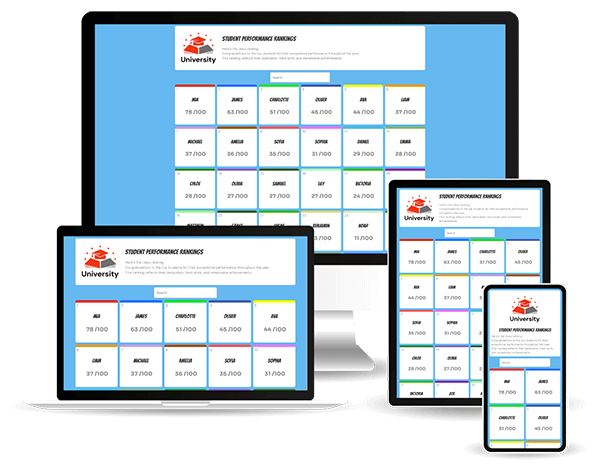
A scoreboard app for any device
A web browser is all it takes—no downloads or installations required. From desktops and laptops to smartphones and tablets, you can seamlessly create, update, and manage your custom scoreboard.
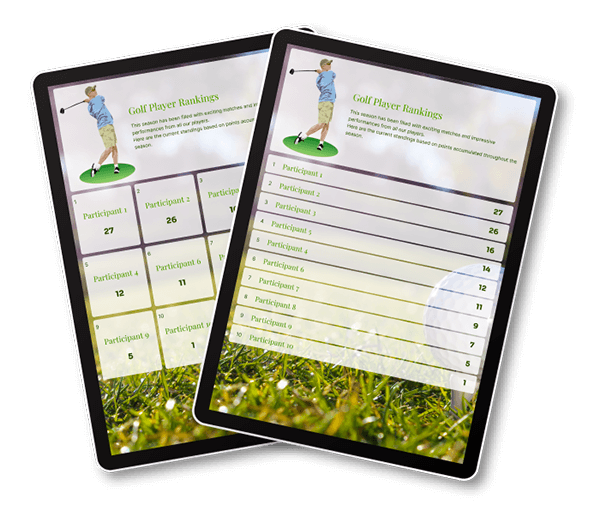
Discover the best scoreboard
Whether you’re running a game, hosting a sports event, or managing an activity, our scoreboard maker is tailored to meet your needs. With intuitive features and an efficient design, tracking scores has never been easier.
Why create your scoreboards with the ScoreLeader app?
A scoreboard can be more than a simple display of scores—it’s a tool that enhances engagement, reflects your brand, and enriches the experience for users and audiences alike. With the scorekeeper ScoreLeader, you can create custom scoreboards that are both visually appealing and highly functional, delivering impact in real-time and adapting to various needs.
- Fosters real-time engagement: A live scoreboard keeps users connected and focused, allowing them to follow updates in real-time. Whether it’s a sports match, a company challenge, or a community event, instant score updates add excitement, encouraging everyone to stay engaged.
- Aligns seamlessly with your brand: ScoreLeader’s customizable options let you design a scoreboard that reflects your brand’s personality. Integrate colors, logos, and unique layouts to make your scoreboard an extension of your brand, enhancing recognition and creating a cohesive experience for your audience.
- Captures attention with standout visuals: A dynamic scoreboard not only tracks scores but also grabs attention. ScoreLeader provides various design tools to make your scoreboard visually compelling, transforming it from a basic score tracker to a central feature that people enjoy following.
- Adaptable to any environment: ScoreLeader’s flexible scoreboards fit effortlessly into different contexts and atmospheres. Use bold, vibrant designs for high-energy sports events or opt for a clean, professional style for corporate or educational settings. This adaptability ensures your scoreboard complements the event’s tone and connects with the audience.
- Offers more than just numbers: Beyond displaying scores, a scoreboard with ScoreLeader enhances the overall experience by providing context and a sense of progress. With ScoreLeader, you can add custom information or visuals, transforming the scoreboard into an informative and interactive part of your event.
Choosing ScoreLeader means selecting a versatile and visually engaging tool for your scorekeeping needs. Start building your scoreboard today and discover how ScoreLeader can transform the way you display scores at your events, support your brand, and keep users invested from start to finish.
Start instantly. No account needed.
Frequently Asked Questions
What is an online scoreboard maker?
An online scoreboard maker is a web-based tool that lets you create, customize, and manage scoreboards directly from your browser. With ScoreLeader, you can track scores, display live results, and share your scoreboard with players, spectators, or participants through a simple link.
Is ScoreLeader's online scoreboard maker free?
Yes. ScoreLeader offers a free online scoreboard maker that lets you create scoreboards, customize colors, track scores in real time, and share results. Free boards remain accessible for 10 days. Premium options are available if you need extended access, advanced branding, or collaboration features.
Do I need to download an app to create a scoreboard?
No. ScoreLeader works directly in your web browser, so there is no software to download or install. You can create and manage your scoreboard on a desktop computer, laptop, smartphone, or tablet with an internet connection.
Do I need an account to create a custom scoreboard?
No. You can start creating a custom scoreboard without signing up. If you want to save and manage your boards over a longer period, creating a free account is recommended.
Can I customize the design of my scoreboard?
Yes. ScoreLeader lets you customize your scoreboard to suit your event or activity, including its colors and display options. With Premium, you can also add custom branding elements such as logos, images, and backgrounds to create a more personalized look.
Does ScoreLeader update scores in real time?
Yes. When you update a score, the public scoreboard reflects the changes in real time. This allows players, spectators, and other participants to follow the latest results without manually refreshing the page.
Can I use ScoreLeader for sports, games, and other events?
Yes. ScoreLeader is designed for a wide range of activities, including sports matches, tournaments, school competitions, quizzes, team challenges, and community events. You can create a scoreboard that fits your activity and adapt its appearance to your needs.
Can I display my online scoreboard on a TV or projector?
Yes. You can open your public scoreboard in a web browser on a compatible TV, computer, or connected device. You can also use a projector to display live scores during sporting events, tournaments, presentations, or group activities.
How can I share my scoreboard with other people?
You can share your scoreboard using its public link or QR code. Anyone with access to the link can view the latest results without creating a ScoreLeader account. This makes it easy to keep players, spectators, colleagues, and participants informed during an event.
Can multiple people update the same scoreboard?
Yes. With ScoreLeader Premium, you can share access links with other people so they can manage and update the same scoreboard from their own devices. This is useful when several organizers, scorekeepers, or team members need to collaborate.
Can I embed my scoreboard on my website?
Yes. You can embed a public ScoreLeader scoreboard on your website using an iframe. This lets your visitors view live scores directly on your own page without having to navigate to a separate website.
Can I use ScoreLeader on my smartphone?
Yes. ScoreLeader is browser-based and works on smartphones, tablets, laptops, and desktop computers. You can create, manage, and view your scoreboard from your preferred device without installing a dedicated mobile application.
How long does it take to create a custom scoreboard?
You can create a custom scoreboard in just a few minutes. Choose the appropriate board type, configure its settings, add your participants or teams, and customize its appearance. Once your board is ready, you can start tracking scores and share the results.
What is the difference between a free and a Premium scoreboard?
The free version includes essential scorekeeping features, customization options, real-time updates, public sharing, and QR codes. Premium adds an ad-free experience, extended board access, additional branding options, shared management access, and custom public links. You can choose Premium when your event or project requires these additional features.
Can I use ScoreLeader for professional events?
Yes. ScoreLeader can be used for sporting events, tournaments, school activities, corporate competitions, and community gatherings. Its customizable display, real-time updates, and sharing options make it suitable for both informal activities and more organized events.
How do I create my first online scoreboard?
Getting started is simple. Open ScoreLeader, choose the type of scoreboard you need, configure its settings, and customize the design. You can then enter scores, display your board, and share it with others. No installation or account is required to get started.